
Weapon names visible in the Blacksmith
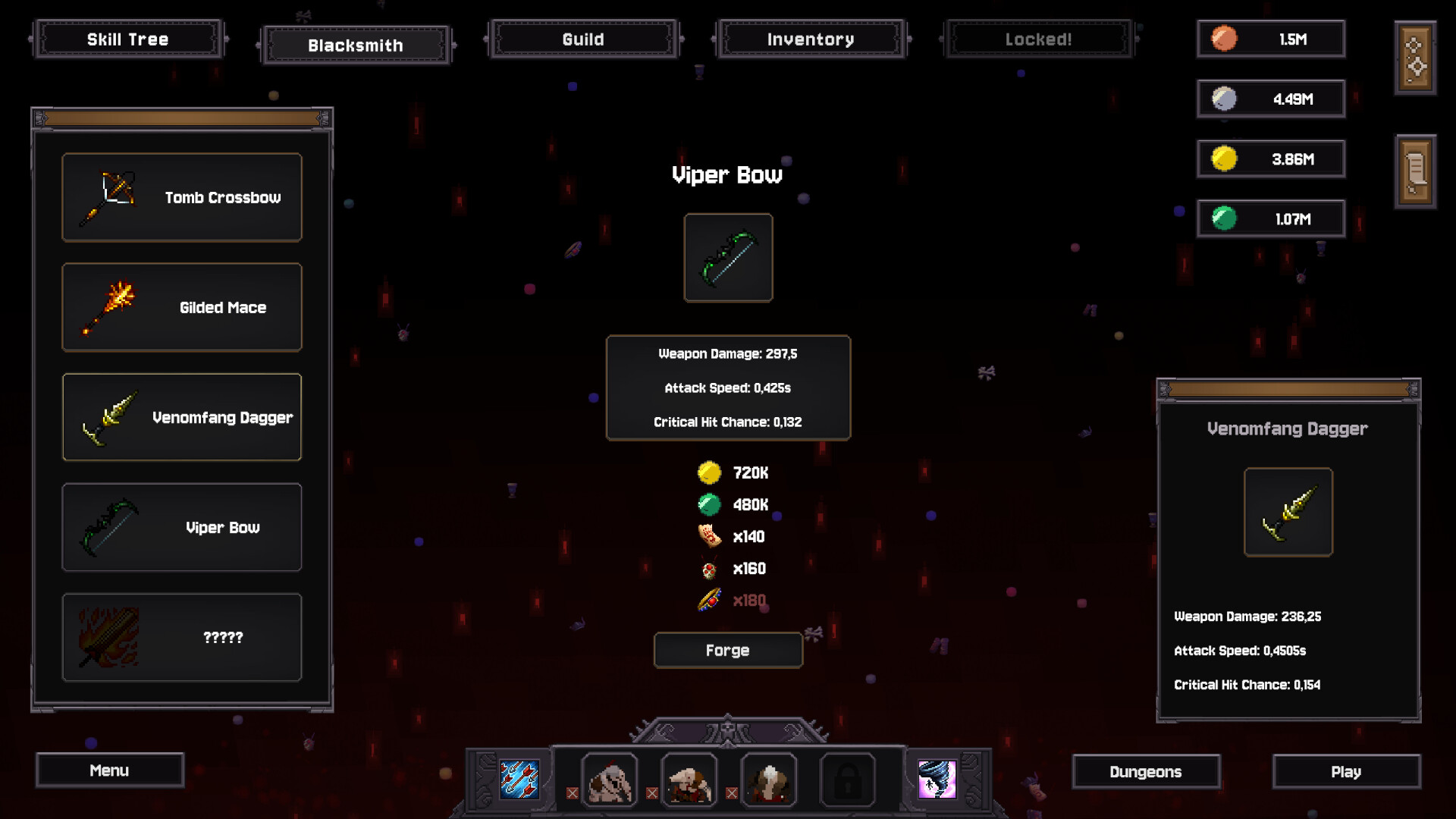
The official Blacksmith image names Tomb Crossbow, Gilded Mace, Venomfang Dagger, and Viper Bow. These give you four specific entries to recognize in the interface; they are not a complete sixteen-weapon list or an unlock order.
Use the comparison example below to read a revealed recipe. If ingredients are missing, the material reservation checklist explains what to keep before selling items. Hidden entries require unlock information, not simply more of a known ingredient.
Read the Blacksmith before you spend
The official Blacksmith screen shows a weapon list on the left, the selected weapon and its recipe in the center, and a comparison panel on the right. The example includes Tomb Crossbow, Gilded Mace, Venomfang Dagger, and Viper Bow.
- Select the weapon you want. Read its damage, attack timing, and critical hit chance.
- Check each resource separately. A recipe can ask for more than one currency as well as several materials.
- Collect what is missing. Keep the ingredients earmarked for this recipe out of your sell pile.
- Use Forge when the requirements are met. Confirm the weapon you intend to use before your next comparison run.
Example: read the Viper Bow comparison
In the official screenshot below, Viper Bow is selected in the center and Venomfang Dagger appears in the comparison panel. These are promotional screenshot values, not current base stats or a farming recipe.
On a small screen, scroll the table sideways to see every column.
| Displayed stat | Viper Bow | Venomfang Dagger |
|---|---|---|
| Weapon damage | 297.5 | 236.25 |
| Attack timing | 0.425 seconds | 0.4505 seconds |
| Critical chance (raw display) | 0.132 | 0.154 |
The selected bow displays more damage and a shorter attack interval, but less critical chance. That is a tradeoff, not enough evidence to name a best weapon. The recipe also needs multiple currencies and three item types: a sufficient coin balance alone does not satisfy every requirement.
A hidden weapon is not the same as an unaffordable one
The promotional Blacksmith screenshot includes an unrevealed entry marked with question marks. It does not show the complete condition for revealing that weapon. If your entry is hidden, check the unlock information available in your own build; farming more of a visible recipe’s materials may not reveal the next weapon.
We have not verified a complete weapon-by-weapon unlock list. The full release advertises 16 weapons, but that does not tell you the order in which your save will reveal them.
Compare more than the damage number
A weapon’s single-hit damage is only part of its performance. The Blacksmith also shows attack speed as a time in seconds and a critical hit chance. Keep the units in mind when comparing timings.
On a small screen, scroll the table sideways to see every column.
| Check | Why it matters |
|---|---|
| Damage and attack timing | A harder hit does not automatically mean better damage over a whole run. |
| Critical hit chance | Compare it alongside any critical-focused effects in your party. |
| Attack pattern | The game gives weapons distinct attack styles. Try the new pattern in a familiar room. |
| Total recipe cost | Spending on a weapon may delay a Skill Tree or hero purchase using the same resources. |
Make a small materials plan
Pick your next weapon first. Note the missing ingredients, check the available room rewards, and run the room that supplies what you need. If coins are the only shortage, review surplus items in Inventory after reserving the recipe materials.
Compare your next forge with one useful Skill Tree purchase. Choose the option that addresses your current bottleneck, then measure the change in the same room.
For that tradeoff, continue to the Skill Tree.
QUICK QUESTIONS
Before your next run
Should I sell all my materials for coins?
Check your next recipe first. Items have both a crafting use and a sale value, so selling the ingredients you still need can put the next weapon further away.
Are the costs in the screenshot a recipe guide?
No. They show how the Blacksmith presents its requirements. Read the current recipe in your own game for the amounts you need.
How to plan a weapon upgrade
B targets Viper Bow and repeatedly checks Blacksmith while collecting the missing material. The run reaches 180 of the required item before forging. This illustrates tracking an ingredient separately from currency; it is not a current recipe claim, and the narrator’s nickname “bands” is not a verified item name.
- Select the weapon in Blacksmith and note every missing ingredient.
- Check your room’s rewards and the relevant enemy unlock.
- Collect item drops while farming; early coin collection does not also collect every material.
- Return to the recipe, forge when ready, and confirm which weapon is equipped.
A also encounters a weapon blocked by a Wizard-related drop. If you have enough money but cannot forge, inspect materials and enemy access before spending your savings elsewhere.
Video B: 2:36:52–2:45:12. Source notes.
Video A: 1:12:03–1:14:49. Source notes.
Sources & scope
Gameplay video sources
A: Looting Millions of Skeletons for Upgrades! — Idle cub. B: This is a Powerful Incremental With a Guild! | Bones and Coins — Ash Swoon.
Gameplay examples are based on the video transcripts, reviewed September 8, 2026. A describes a full-game run; B introduces the game ahead of its September 7 release. Exact build numbers and video frames were not verified. Use current in-game tooltips for prices and balance.
Based on the full-release announcement, official store screenshots and game description, and clearly labeled Demo patch notes. Screenshots are examples, not live balance data.
Suggested comparisons and purchase decisions are editorial guidance, not playtested optimal routes. See how this guide was put together.
Found an error? Read the corrections policy with the page, game version, and supporting screenshot or source.